

Artificial intelligence is increasingly appearing in mobile and web applications. Just a few years ago, implementing AI in apps required building your own models, training them on massive datasets, and maintaining complex infrastructure. Today, it looks completely different.
In most cases, AI features are created by integrating ready-made models available via APIs. This allows applications to generate content, analyze data, hold conversations with users, or process documents without the need to build their own AI systems.
In practice, implementing AI in an application relies on three key elements: integration with an AI model, well-designed prompts, and control over token costs. These factors largely determine whether an AI feature will be effective and cost-efficient.
In this article, we explain how AI features work in applications, how much they cost, and what the implementation process looks like.
Why Companies Want to Implement AI in Apps
In recent years, artificial intelligence has become one of the most important trends in digital product development. More and more companies are choosing to implement AI because it allows them to automate processes and increase product value for users.
AI can analyze data, answer user questions, and generate reports without human involvement. Imagine a situation where a user uploads a contract into an application. Instead of manually reviewing dozens of pages, they click an “analyze” button, and the AI highlights potential risks and suggests changes.
Large language models (LLMs) are also widely used for content generation, such as product descriptions, marketing materials, or report summaries.
AI is increasingly used for analyzing documents and large datasets. It can also personalize the user experience by adjusting content, recommendations, or communication based on user behavior.
AI in Apps: How It Works Behind The Scenes
From the user’s perspective, an AI feature is simple: they type a question or click a button and get a response. Behind the scenes, there is a structured technical architecture.
Most often, it looks like this:
application (frontend) → backend → AI model API → model response
In modern digital products, AI features are typically implemented by integrating AI models via APIs and managing logic on the backend.
The application sends a request to the backend, which prepares an appropriate prompt based on predefined rules and sends it to the AI model via API. The model processes the data and generates a response, which returns to the backend and then to the application.
The backend plays a crucial role here.
- First, it ensures the security of API keys, which should never be stored directly in a mobile app or browser. An API key is a unique identifier that allows access to an AI provider’s model. If exposed, it could be misused by third parties, generating costs for the system owner.
- Second, the backend helps control AI costs by limiting requests, filtering data sent to the model, and optimizing prompts.
- Third, it enables data processing before sending it to the model. For example, the application may retrieve data from a database, transform it, and only then pass it to the AI.
Today, the standard approach for working with private company data (e.g., contract analysis or internal assistants) is RAG (Retrieval-Augmented Generation). A language model cannot “memorize” all company documents, and sending them entirely with every request would be slow and expensive.
Instead, vector databases are used. When a user asks a question (e.g., about a clause in a 100-page document), the backend quickly searches the vector database, retrieves the most relevant paragraph, and attaches it to the prompt with an instruction like: “Answer the user’s question based only on this text.” This approach provides precise context, significantly reduces token costs, and minimizes hallucinations.
In some cases, models can also run locally – on company servers or even on the user’s device. This is mainly used when data control is critical.
If you plan to add AI features to your application, contact us and we will help you design them at the system architecture stage.
Book a free consultationAI Models Used in Applications
In modern applications, developers rarely rely on a single model provider. Increasingly, they use AI model aggregators such as OpenRouter, Together AI, or Fal.ai, which provide access to multiple models via a single API. This makes it easy to compare quality and costs and dynamically choose the best model for a given task.
The most common approach to implementing AI in apps is using cloud-based models via API. General-purpose models like chatGPT, Claude, or Gemini offer broad capabilities – from content and code generation to document analysis and multimodal processing – making them popular for prototypes and applications where data is not highly sensitive.
For projects requiring higher data security, cloud solutions with isolated infrastructure (e.g., Google Vertex AI) are used. These allow companies to use AI models in a private cloud environment without using customer data for training.
Organizations that require full control over data often use locally hosted models, such as Llama or Mistral. This ensures maximum privacy but requires greater investment in hardware and infrastructure.
In practice, hybrid architectures are becoming more common: simpler queries are handled by cheaper local models, while more complex ones are routed to advanced cloud models. This balances cost, performance, and security.
AI in Apps: Practical Examples of AI Features in Software
- Content generation – AI can create product descriptions, landing page copy, or marketing materials.
- Chatbots and educational conversations – the application interacts with the user, answers questions, or provides knowledge.
- Document analysis – AI models can analyze contracts, verify legal correctness, and suggest changes with explanations.
- Working with images and user input. Example: we created SmartChef, a mobile app, where the user choses ingredients, type of diet and difficulty level and the system generates ready-to-cook recipes with realistic pictures of the finished dish.
- Learning support – AI accelerates the creation of educational courses. Example: LearnGo. The platform is a learning management system we created and enriched with AI functionality: the user starts by entering keywords, and the system automatically generates the whole course structure with its description, tags, chapters, and modules. Every part of the course is editable. This means there’s no need to create content manually – just add materials or videos, and AI takes care of the rest.
Prompt Engineering – a Key Element of AI Functionality
One of the most important aspects of AI features is the prompt. A prompt is an instruction sent to the model that defines what it should do and how to respond.
A good prompt typically includes several elements: the model’s role, task context, input data, and response format.
Example:
“You are an English teacher helping with learning. Based on the material below, create 5 flashcards and 3 multiple-choice quiz questions. Use simple language suitable for beginners. Return the response in JSON format with ‘flashcards’ and ‘quiz’ sections.”
Prompts are often adjusted depending on the user type, input data, or application context. You can modify tone, level of detail, or output format.
Prompt design is an iterative process. The first version is tested with sample data, then improved and tested again.
Sometimes a good result can be achieved after just a few iterations. In more complex projects, optimization may take longer, especially when AI features evolve alongside the product.
Often, not only developers but also domain experts (e.g., lawyers or educators) are involved in prompt creation. They ensure responses are accurate, appropriate, and tailored to the target audience.
Can Administrators Control AI Behavior?
In many applications, administrators can control how AI functions operate.
They can modify prompts or model parameters, such as response length or generation style. This allows continuous adjustment to user needs and optimization without rebuilding the entire system.
How Much Will Implementing AI in Your App Cost?
Using AI models via API is different from typical subscription tools like ChatGPT. You pay for actual usage, which means each request to the model uses up your credits.
To use an API, you need to connect a payment method and set usage limits to control spending.
Each request consumes tokens. For example, an e-commerce store generating product descriptions might use around 300 tokens per request (e.g., 120 for the prompt and 180 for the response). With pricing around $0.25 per million input tokens and $2 per million output tokens, the cost per description would be about $0.00039. Generating 1,000 descriptions would cost roughly $0.39.
A token is the smallest unit of text processed by the model. It can be a word, part of a word, number, or punctuation mark.
Models process text as tokens rather than full sentences. Each request includes input tokens (sent to the model) and output tokens (generated by the model).
Roughly, 1,000 tokens correspond to about 750 English words.
The cost depends on both input and output tokens. A typical operation may use from a few thousand to tens of thousands of tokens.
You can think of it like fuel consumption – cost depends on how you use it.
How to Reduce AI Costs by 10–20x
Costs can be significantly reduced with proper system design.
One of the simplest methods is shortening prompts – the fewer tokens, the lower the cost. Choosing the right model is also key: many tasks can be handled by cheaper models: think about as Paint vs. Photoshop for the task of resizing a file – both will do it equally well..
Caching responses is another common technique. If users ask similar questions, the system can reuse previous answers instead of sending new API requests.
More advanced systems use model pipelines: a cheaper model first evaluates the query, and only complex cases are forwarded to a more advanced model.
Implementing AI in Apps Step-by-Step
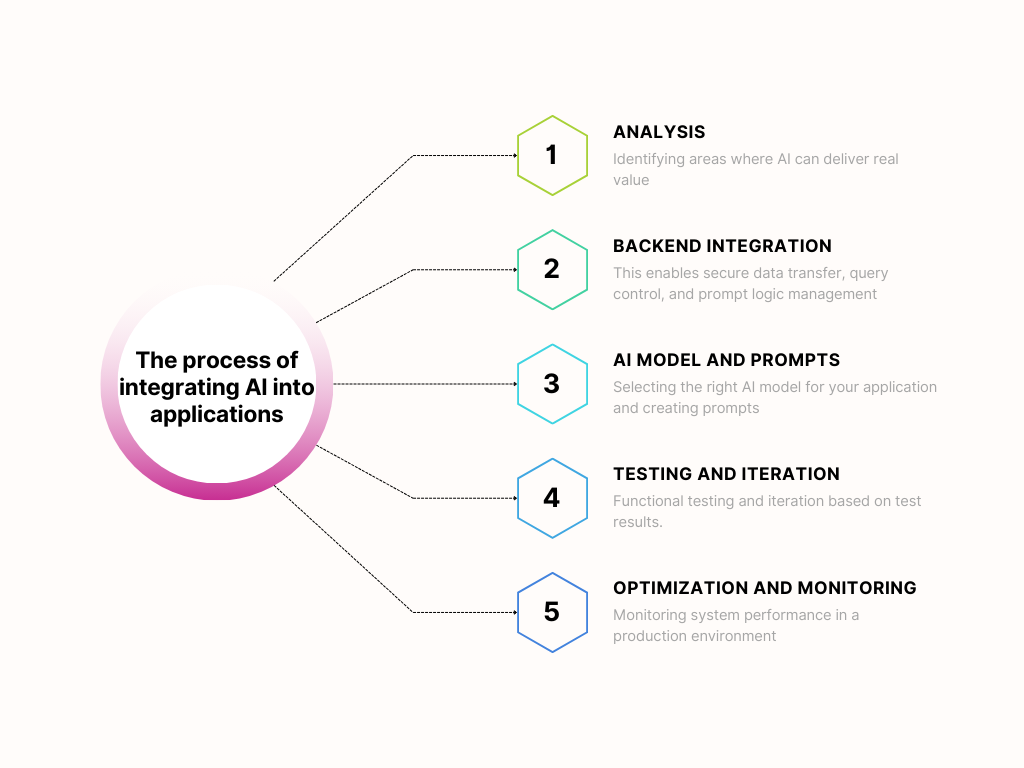
The process starts with identifying areas where AI can bring real value. The team analyzes which processes can be fully or partially automated.
Next comes backend integration (secure data handling, request control, and prompt management). Only then is the appropriate AI model selected – cloud-based or local – depending on security and performance needs.
Prompts and AI logic are then developed by a team of developers and domain experts. The user interface is created, and initial scenarios are tested.
After deployment, prompts are iterated to optimize costs and receive better results. The system is then monitored and token usage tracked.
Common Mistakes When Implementing AI
Here are most common mistakes that people make when implementing AI to their apps:
- Lack of token optimization leading to higher costs
- Using overly advanced models for simple tasks
- No prompt iteration – first versions rarely perform well
- Poor UX design that makes AI features hard to use
- No cost control or API usage monitoring
API usage can be tracked in provider dashboards. For example, OpenAI offers a “Usage” section, and Google AI Studio provides insights into model usage and limits.
Summary
Adding AI features to an application no longer requires building models from scratch. In most cases, integrating existing AI models and designing a proper system architecture is enough.
The key elements are: well-designed prompts and effective cost control related to token usage.