
Your app is working properly. Users aren’t reporting any issues, you haven’t commissioned any new features, and the last time you asked someone to change the code was six months ago. And yet, every month, you receive an invoice for application maintenance.
What exactly are you paying for if nothing is changing? The answer “maintenance” doesn’t explain much because it doesn’t tell you what the work actually involves.
If your app is still being built, you’ll face the same question shortly after launch. So make sure you factor application maintenance into your budget. How much should you expect to spend? We explain below.
In this article, we break down exactly what application maintenance covers, whether you can do without it, how many hours it typically takes each month, and what the maintenance cycle looks like. We also explain what you’re actually agreeing to when you sign a maintenance contract: the difference between critical and non-critical bugs, and when round-the-clock team availability makes sense versus when it’s an unnecessary expense.
What Application Maintenance Is (and What It Isn’t)
The need for maintenance stems from a simple fact: even when an app’s code remains unchanged, the environment around it continues to evolve.
That environment includes everything the app depends on. A web app runs in a browser and on a server, while a mobile app runs on a phone powered by iOS or Android. Both rely on open-source libraries developed independently of the company building the app, as well as third-party services such as payment providers and mapping platforms.
Every one of these components is regularly updated by its respective developer, and those changes often have a direct impact on the app. For example, a new version of Android may restrict background activity, causing a delivery app to stop updating a driver’s location in real time. A browser may tighten its cookie policies, breaking third-party login functionality in a web app. In neither case has anyone changed a single line of the app’s code.
Mobile apps also have to meet app store requirements. Apple and Google raise the technical requirements for apps published on the App Store and Google Play every year, meaning that even an app with no new features needs to be rebuilt regularly.
That’s why maintenance isn’t just about responding when an app stops working. Being ready to handle an outage is part of the job, but it accounts for the smallest share of the work. Most maintenance is carried out to prevent outages from happening in the first place. The app is updated continuously, before changes in its environment have a chance to break it.
This work falls into four categories:
- Bug fixing. Users report that the app crashes when they try to save a photo. The team identifies the cause and releases a fix. This is the only part of maintenance that most people instinctively associate with the term.
- Adapting to changes in the app’s environment. A payment provider releases a new version of its system and shuts down the old one a few months later. If the app isn’t migrated in time, payments stop going through. The app won’t adapt to the change on its own.
- Preventing problems before they occur. Security is the most common example. A vulnerability is discovered in one of the libraries used by the app. The team replaces the affected version with a secure one, closing the issue before anyone has a chance to exploit the vulnerability.
- Improving what already works. A product list takes four seconds to load, so the team reduces that time to one second. Nothing was actually broken, but the app has become more convenient to use.
In industry literature, these four categories are known as corrective, adaptive, preventive, and perfective maintenance, respectively. The terminology itself isn’t particularly important; what matters is the distinction.
Pay particular attention to the second and third categories: adaptation and prevention. This is work that nobody explicitly requests and that users never notice. It exists because the app’s environment changes, even when the app’s own code doesn’t.
Where Maintenance Ends and Development Begins
There’s another type of work that often gets lumped into the same category: adding new features. Strictly speaking, this is product development, not maintenance, and it is usually billed separately.
Ongoing application maintenance typically includes:
- Monitoring the app’s performance and responding to outages.
- Fixing reported bugs.
- Updating libraries and tools, including patching known security vulnerabilities.
- Making mandatory updates required by app stores.
- Implementing minor fixes and improvements.
- Reporting on the work completed.
The following types of work are usually quoted separately:
- New modules and major features.
- UI redesigns.
- Full security audits and penetration testing.
- Application architecture overhauls.
- Additional integrations with external systems.
It’s worth distinguishing between two things that are often described using the same terminology. Replacing a library with a known vulnerability might take just a few hours and fall within the scope of ongoing maintenance. A full security audit, in which specialists actively attempt to attack the application to identify exploitable weaknesses, can take several days and is commissioned separately.
Establishing this boundary at the beginning of a working relationship saves both parties a great deal of frustration later. When the scope is unclear, clients start feeling that they’re paying for nothing because they can’t see any tangible results. Meanwhile, the development team keeps receiving more “small requests” that add up to several days of work over the course of a month, without any clear way to bill for them.
Before signing anything, ask for a specific breakdown of what’s included in the maintenance agreement and what will be charged separately.
Got an idea?
Let’s make it happenIs Application Maintenance Mandatory?
You’re not required to sign a maintenance contract. You can accept the completed application, pay the final invoice for its development, and never spend another penny on it.
But that’s not the real question. The issue isn’t whether you sign a contract, but whether work will need to be done on the app. And it will, regardless of your decision, because some of that work is driven by third parties over which you have no control.
Here are two of the most common examples.
App Stores Set Deadlines You Can’t Negotiate
The technical requirements Apple and Google impose on apps aren’t suggestions or best practices. They’re conditions for distribution. In 2026, the requirements are as follows:
- From April 28: Every app submitted to the App Store must be built using Apple’s latest software development tools.
- From August 31: Google Play requires new apps and app updates to target the latest Android version, while already-published apps must meet the target-level requirement from the previous year.
Further deadlines will follow in 2027, and more the year after that. This isn’t a one-off task that you can complete and forget about. It’s an ongoing cycle in which every app distributed through an app store must be rebuilt and tested to remain compliant.
The consequences of missing a deadline are less obvious than you might expect. Existing users can keep using the app, so at first glance, nothing seems to happen. However, you lose the ability to publish updates, so if a serious bug emerges, you won’t be able to fix it until you’ve caught up with the outstanding requirements. On Google Play, there’s a second effect: the app stops being available to new users whose devices run a newer Android version than the one your app targets.
Services Your App Depends On
The second situation is even less intuitive because there’s no calendar deadline or warning in your dashboard.
Push notifications, maps, payments, Google or Facebook login, and analytics: these features aren’t usually built from scratch. Instead, apps rely on ready-made services provided by other companies. The problem is that these companies discontinue services when they are no longer commercially viable.
In August 2025, Google shut down Firebase Dynamic Links, a widely used service that handled links opening specific screens within an app. Every link it served stopped working. For their owners, the situation was much the same: they hadn’t changed anything, yet parts of their apps stopped working properly. They had to commission a replacement solution and pay for the work. In our portfolio, a single decision by Google forced changes across several apps at once.
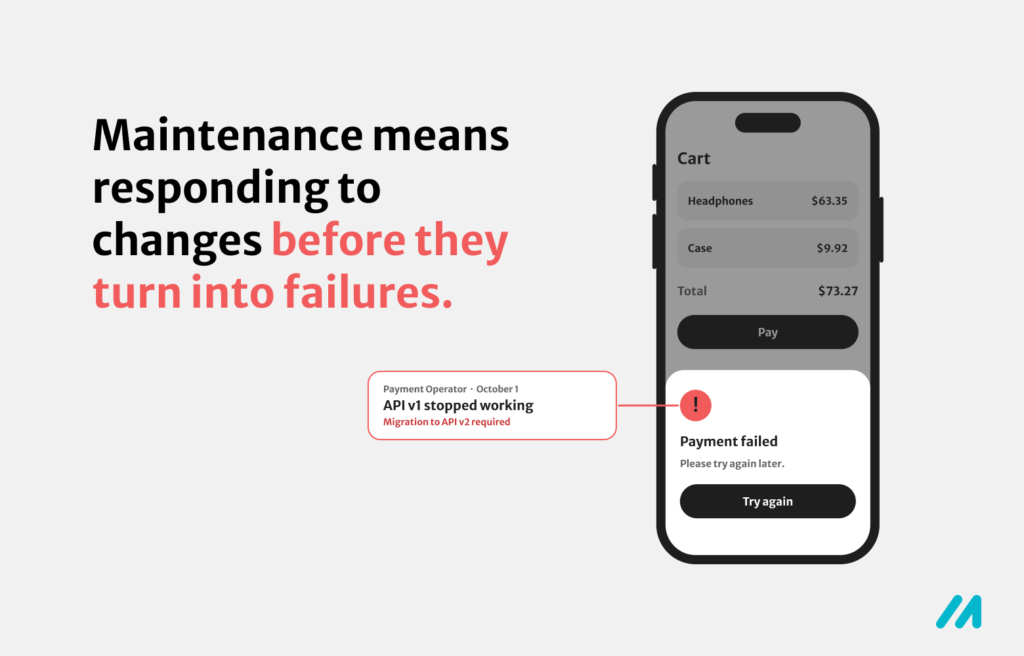
This is what maintenance most often looks like in practice. It’s not about cleaning up after your own mistakes; it’s about keeping up with a world that continues to change around your app.
So, Can You Do Without Maintenance?
You can do without a contract. You can’t entirely avoid the work.
The only difference is when you do the work and under what conditions. With ongoing maintenance, the workload is spread across a few hours each month. You know the cost in advance and have greater peace of mind.
Without ongoing maintenance, the work accumulates and comes back at the worst possible moment, usually when the app stops working and you need a fix immediately.
There is, however, one situation in which maintenance can be kept to a minimum. If the app is simple, has no custom backend, relies on few external services, and doesn’t process sensitive data, occasional support without a fixed monthly allocation of hours may be sufficient. You commission work only when a specific need arises, such as a new app store requirement.
What Happens If You Neglect Maintenance for Two Years?
You may not feel the consequences of neglect until you want to change something in the app. You request a minor fix, something that should take one day of work, and receive a quote for three weeks.
It’s not that the fix itself is particularly difficult. The problem is that it can’t be implemented without first sorting out everything that has been neglected over the previous two years.
Outstanding updates don’t simply add up one by one. You’re not looking at twenty-odd small changes to catch up on, but potentially one major overhaul. Application components are interconnected, so upgrading one may require changes to a dozen others.
Individually, each change would be straightforward: update one component, check the parts of the app that use it, and move on. But when a dozen components need updating simultaneously, each change can break something somewhere else in the application. And when a bug appears, the hardest part is identifying which change caused it.
That’s why most of those three weeks in the quote will be spent not on updating the app itself, but on checking that everything still works.
How the Application Maintenance Cycle Works Under an SLA
There’s no single answer to the question of how many hours application maintenance takes each month. In practice, the workload isn’t simply guessed in advance. Instead, the terms are established in an SLA.
An SLA, or Service Level Agreement, defines the rules for supporting an application. It specifies how issues are reported, how they are prioritized, how quickly the team responds, when the team is available, how complex issues are escalated, and how the work performed is billed.
Monthly Hour Allocation and the Reporting Process
The most common model is based on a monthly allocation of hours. You agree with the service provider on how much time the team will have available each month. For applications of low to moderate complexity, this allocation typically ranges from 6 to 24 hours per month.
The allocation also needs to account for unexpected situations: an outage at a payment provider, a sudden change to an external system, or a bug that appears only on a particular phone model. These things happen in any project, so it’s worth leaving some room in the allocation for unplanned work.
Issues are submitted through a single, agreed-upon channel, such as a ticketing system. Each issue follows the same process:
Report → Triage → Prioritization → Scope definition → Implementation → Testing → Deployment → Closure and reporting
The second step is particularly important. During triage, the team determines whether the issue falls within the scope of maintenance at all. Bug fixes and adjustments required by changes to external systems are generally covered by the allocation. A new feature or a major overhaul is quoted separately and shouldn’t automatically be treated as work covered by the SLA.
At the end of each month, you receive a report showing how the allocated hours were used. It lists the issues handled and the time spent on each one. This gives you a clear picture of exactly what you’re paying for.
An Example of a Maintenance Cycle
Some work is performed independently of incoming support requests. In most projects, the schedule follows a similar pattern.
Ongoing: The team monitors application performance, crash reports, and the security of the libraries in use. This isn’t something that can be done just once a month: a vulnerability can be disclosed at any time and may require an immediate response.
Every few weeks or once a quarter: Libraries are updated, application performance is reviewed, and server costs are assessed.
Several times a year, often without a fixed schedule: Larger changes become necessary due to external requirements. These may include new versions of iOS and Android that the app needs to remain compatible with, new App Store and Google Play requirements, changes to external providers’ APIs, and expiring certificates that secure connections and have specific validity periods. The deadlines for this work are set by external parties, while the amount of work involved depends on the nature of each change.
What Determines the Size of the Monthly Allocation?
The allocation will tend toward the upper end of the range if the app has its own backend and database, relies on numerous external services, processes payments, handles personal data, or operates in a regulated industry. Each of these elements represents a separate area that needs to be monitored and maintained.
The allocation will tend toward the lower end if the app is simple, has few integrations, and has no outstanding updates to catch up on.
However, automated testing makes the biggest difference. It’s also one of the areas where development budgets are most easily cut. An app with automated tests in place is cheaper to maintain because every update requires less manual testing. You pay for the tests once and benefit from them throughout the app’s lifetime.
Looking for tech expertise?
Meet your teamPriorities, Response Times, and Support Hours
You can receive two maintenance proposals for the same app, with similar monthly hour allocations, yet find that one costs several times more than the other. That doesn’t necessarily mean one provider is being dishonest. The difference usually comes down to how quickly and during which hours the team responds to issues.
Not Every Bug Is Equally Urgent
A well-structured agreement divides issues into several priority levels, most commonly labeled P1, P2, and P3. The terminology may vary, but the underlying logic is generally the same.
- Critical issue (P1): A problem that prevents users from using the app or its most important functionality. The app won’t launch, users can’t log in, or payments fail.
- Functional issue (P2): A problem affecting part of the app while leaving the rest usable. For example, the search function fails to find some products, although users can still find them through categories, or notifications arrive late.
- Minor issue (P3): A visual defect or minor detail that doesn’t affect functionality. Text is clipped on one phone model, there’s a typo, or an icon has the wrong color.
Priority shouldn’t be determined by how irritating a bug is to you, but by how many users it prevents from using the app and whether they have an alternative. If the contract doesn’t define these categories clearly, both parties may end up arguing over whether an issue qualifies as critical when the first serious incident occurs.
Response Time Is Not Resolution Time
A commitment to respond within two hours doesn’t mean the bug will be fixed within two hours. It means the team will acknowledge the report, assess its severity, and begin investigating within that time. The fix itself might take an hour or three days.
That’s why a good agreement defines response times and resolution targets separately for each priority level. It should also describe the escalation process: who takes over when a critical issue hasn’t been resolved within the agreed timeframe.
When Does 24/7 Availability Make Sense?
Typically, the team is available during business hours on working days. Around-the-clock support, 24 hours a day, seven days a week, is one of the biggest factors driving up the cost of a maintenance contract because you’re paying not only for the allocated hours but also for the team’s availability.
Having one person keep their phone nearby at night isn’t enough. That person needs to sleep, can get sick, and takes time off. You need an on-call rotation covering multiple people, compensation for being on call, and procedures defining what to do in specific emergency scenarios. These costs recur every month, even when nothing happens.
Round-the-clock availability makes sense when downtime causes immediate, tangible harm. This primarily applies to three types of applications:
- Transaction-based applications, such as large e-commerce platforms and payment processing systems, where every hour of downtime means direct financial losses.
- Healthcare or safety-related systems, where downtime becomes more than just a financial problem.
- Applications supporting processes that cannot be stopped, such as manufacturing or logistics operations.
If downtime simply means that users have to wait a few hours before they can use the app, 24/7 availability is an expense without a clear justification. An outage at 2 a.m. can be identified in the morning and fixed that same day.
The test is straightforward: calculate how much four hours of application downtime would actually cost you. If that amount is lower than the annual price difference between the maintenance contracts, you probably don’t need on-call coverage. If it’s higher, on-call support may be worth the investment.
How to Report a Bug So It Gets Fixed Faster
The way you report a bug has a real impact on how quickly it can be fixed. Many bugs occur only under specific conditions, such as on phones from a particular manufacturer or with a specific operating system version. Before anyone can start fixing the problem, they first need to reproduce it.
That’s why a bug report typically needs to include the phone model, operating system version, and an accurate description of what the user was doing when the problem occurred. With this information, reproducing the issue may take just 10 to 20 minutes. With a report that simply says “the app doesn’t work,” a significant amount of time is spent establishing what exactly isn’t working and under which circumstances. That investigation time is also deducted from the monthly allocation.
Summary
Application maintenance isn’t primarily about fixing outages. Most of the work is driven by deadlines imposed by app stores and changes to the external services your app relies on. Neither is under your control.
Here’s what you should remember:
- You can go without a contract, but you can’t avoid the work entirely. The question is whether you spread it across a few hours each month or pay for it in one go, at a less convenient time and potentially at a higher rate.
- Not every app needs the same level of maintenance. A simple product without a backend or external integrations may not need a fixed monthly allocation of hours. An e-commerce app that processes payments is a different proposition altogether. Before comparing proposals, establish which scenario applies to your app.
- When comparing proposals, focus on the terms, not just the price. Check the size of the monthly hour allocation, the priority levels and their associated response and resolution times, the team’s availability, and whether you receive a report detailing how the allocated hours were used.
If you already have an app and don’t know what condition it’s in, start with a technical review. This should establish whether the technologies in use are up to date, whether the app meets current app store requirements, and whether it contains any known security vulnerabilities.