

AI-Built Applications: How to Prepare a Prototype for Production?
You describe in a few sentences what you want your application to do, and moments later you already have a screen, login functionality, and a database. The prototype looks ready to be shared with customers – everything works flawlessly. But does it really? One study found that AI-generated code contained security vulnerabilities in as many as 45% of development tasks.
However, this does not mean that the entire prototype needs to be rebuilt from scratch. Check eight areas that may hide problems invisible during regular application use. In this article, we walk you through them step by step – from data access and API keys to GDPR compliance, error handling, testing, and backups. We explain what can stay, what needs fixing, and what is better to rewrite.
Key Takeaways
Almost every second AI-generated feature may contain a security vulnerability. In a July 2025 Veracode study, more than 100 language models generated code with vulnerabilities in 45% of 80 development tasks. Larger models did not perform significantly better.
The most common problem is unauthorized access to other users’ data. Broken access control ranks first on the OWASP Top 10 list for 2025, and some form of this vulnerability was found in every application tested.
If user data is leaked, you are responsible. A no-code tool is not obligated to protect your users’ data. One example is the dispute involving customers of the no-code platform Lovable. The platform maintains that the application creator is always responsible for critical security vulnerabilities (CVE-2025-48757).
Reviewing a prototype costs no more than 15% of what it would cost to build the application from scratch. As our projects show, an MVP prototype audit usually takes just a few days and costs no more than 15% of the amount required to build the application from the ground up.
What Do You Have After Vibe Coding?
Vibe coding is a way of building applications in which you describe to an AI model what you want to achieve and accept the generated code without reading it. The term was popularized by Andrej Karpathy in February 2025. The OpenSSF glossary adds an important qualification: if a human reviews the AI’s output, it is no longer considered vibe coding.
What you can do next with your application prototype therefore depends on how you worked and which tool you used to build it.
| Type of tool | Examples | Do you own the code? | Path to the App Store and Google Play | Who maintains and configures the database? |
|---|---|---|---|---|
| No-code | Bubble, Webflow | No. The application runs on the platform on which it was built. | Usually through the platform’s features or by creating a new project | The platform, within the limits of your plan |
| Prompt-based development | Lovable, bolt.new, v0 | Yes, with export to GitHub | Usually requires a separate mobile layer | You, often using Supabase |
| Agent working in a repository | Claude Code, Cursor | Yes, in your repository | Depends on the technology you choose | You |
With no-code tools, you develop your application within the limits of a single platform, and moving it elsewhere usually means rebuilding it from scratch. Prompt-based tools provide code that a developer can take over. However, check whether the export also includes database configuration and access rules, not just interface files. An agent working in a repository gives you the most freedom, but also leaves you fully responsible for everything that goes into the project.
When Does an AI Prototype Need an Audit Before Being Released?
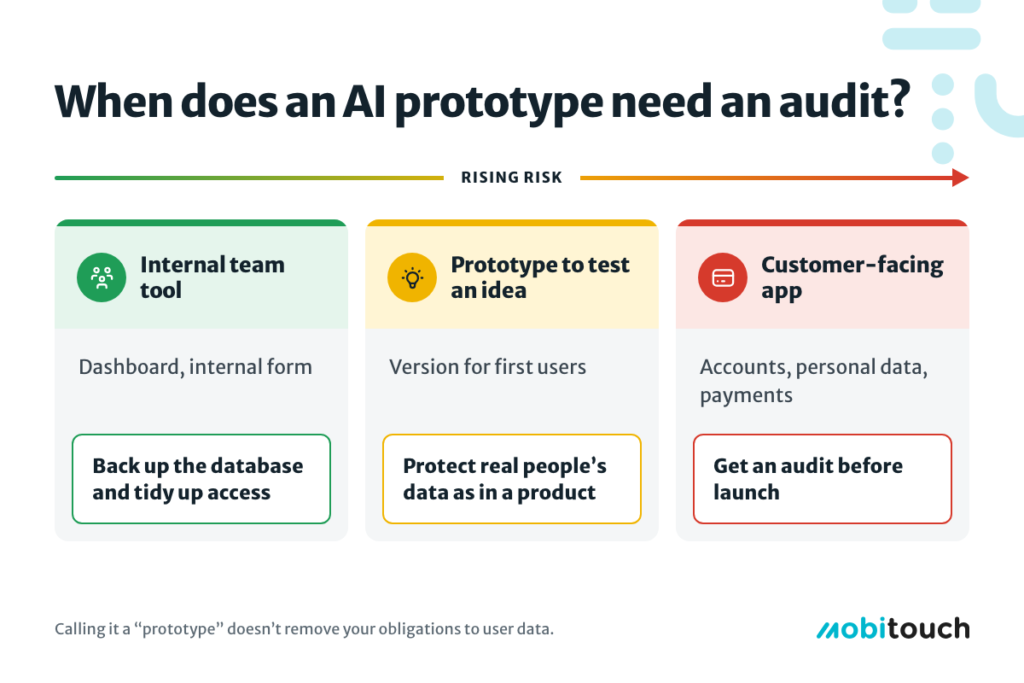
An audit is necessary when people outside your team start using the application and entering their data. This depends on the application’s purpose, not the tool used to build it:
A tool for yourself or your team. A simple dashboard, integration between systems, or a form that does not collect customer data usually does not require a developer. Back up the database, organize access permissions, and use it.
A prototype for validating an idea. This is where vibe coding works best, because you can show people your idea before spending money on production (read more about validating a startup idea). However, if you collect data from real people, the same rules apply as for a regular product. Calling it a „prototype” does not exempt you from these obligations.
An application for customers. Someone creates an account, enters their data, and sometimes makes a payment. Every oversight can mean a data breach or lost payments, which is why the application requires a thorough audit before being made more widely available.
Users do not know that the application was built in a single evening with the help of AI, and they do not need to know. They expect their data to be visible only to them and the application to keep working tomorrow. From that moment on, the prototype becomes a product.
What Should You Check Before the First Customer Logs In?
Before making your application available to customers, check the eight areas listed in the table below. A working interface does not reveal any of these issues, so you need to inspect the code, database, and service settings.
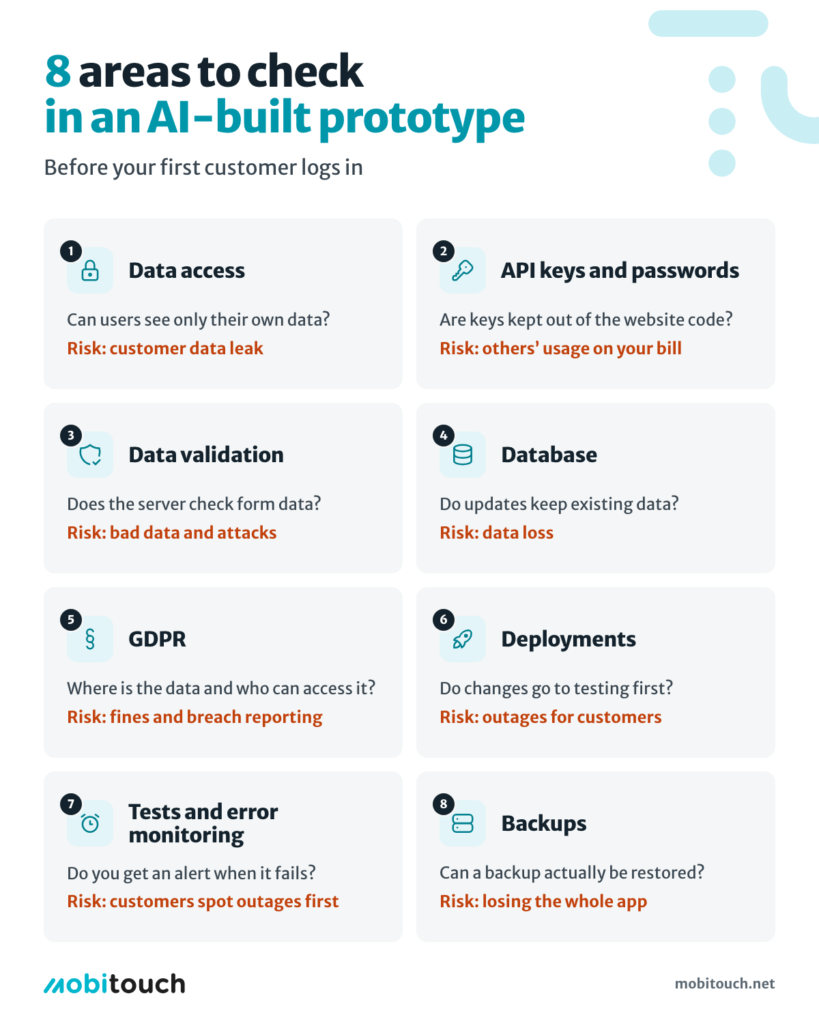
| Area | What to check | What can happen if you overlook it |
|---|---|---|
| Data access | Whether users can see only their own records, including after changing a URL or request parameters | Leakage of all customers’ data |
| API keys and secrets | Whether keys are absent from browser-side code and the repository | Charges resulting from unauthorized API usage, service takeover |
| Data validation | Whether the server validates everything submitted by the user | Incorrect data being saved, attacks through forms |
| Database | Relationships between tables and migrations that do not result in data loss | Data loss during the next update |
| GDPR | Where data is stored, who has access to it, and how it can be deleted | Fines and an obligation to report a personal data breach |
| Deployments | A separate testing environment and a repeatable deployment process | Customer-facing outages after every update |
| Errors, testing, and monitoring | How interrupted payments are handled, tests of key user journeys, and alerts | Finding out about an outage from a customer |
| Backups | Frequency, storage location, and recovery testing | No way to recover data |
Check Data Access First
A login screen does not guarantee that users can access only their own data. If your application uses Supabase, every table in an exposed schema must have RLS rules enabled. RLS (Row Level Security) determines who can read and modify a given row. Without these rules, anyone with access to the table may be able to read and modify it, including unauthenticated users (Supabase documentation).
This is exactly the problem described in the CVE-2025-48757 report: applications generated with Lovable up to April 15, 2025, had missing or incorrectly written RLS rules, allowing unauthenticated users to read and modify data. Matt Palmer and Kody Low, engineers at Replit (incidentally, a competing tool), scanned 1,645 applications from the Lovable gallery and found that user data in 170 of them was accessible to anyone (Semafor). The vulnerability received a CVSS score of 9.3 out of 10 (Critical severity). Lovable disputes the report, arguing that application creators are responsible for data protection. This clearly demonstrates that you cannot transfer this responsibility to the tool.
Does this mean Supabase is unsafe? No. Supabase protects data effectively when RLS rules are enabled and correctly written. The problem was with the application’s configuration, not the database itself.
Does this mean Lovable is a bad tool? Not at all. It works well for prototypes and MVPs, but generated code is not automatically secure. Before an application starts processing real data, its access rules must be checked.
You can find more information about choosing a backend in our comparison of Firebase, Supabase, and a custom backend.
Backups Don’t Create Themselves
Automatic database backups are often a feature of paid plans. Supabase does not provide automatic backups on its Free plan (Supabase); daily backups stored for 7 days are available on paid plans starting from USD 25 per month (Supabase pricing).
However, a database backup alone is not enough. Files uploaded by users, such as photos or documents, are often stored separately and require their own backups. Your code should be stored in a repository, while keys and settings should be kept in a secure location outside the hosting environment itself.
A backup that nobody has ever tried to restore can hardly be considered a safeguard. Before launch, restore your application at least once in a test environment.
GDPR Applies From the Moment You Store the First Email Address
If your application processes personal data, Article 25 of the GDPR requires data protection to be incorporated from the design stage, for example through pseudonymization. According to the European Data Protection Board, this obligation applies to all controllers, irrespective of their size.
An external service (such as Supabase) acts as a data processor under the GDPR, meaning that it stores data on your behalf. The application owner remains the data controller and is responsible for determining who has access to that data (Articles 24 and 28 of the GDPR).
A good example is the Bilingers application, which supports early childhood bilingualism. Its analytics work without collecting data that identifies users. Among other things, the application measures the time until the first song is played and how often users return to the app, without collecting information that could identify a parent or child.
Testing and Monitoring Replace Manual Clicking Through the Application
A prototype usually works under ideal conditions: data is correct, payments go through, and external services respond as expected. In a production application, you need tests covering the main user journeys and an error-tracking tool, such as Sentry, so that you know about an outage before your customers do.
Our article on why application testing is essential explains how to approach this process.
What Does a Technical Audit of a Prototype Look Like?
A technical audit is an assessment of the code, database, documentation, and deployment process. It ends with a list of what to keep, what to fix, and what to rewrite. Its purpose is not to rebuild the application from scratch, but to make decisions based on facts rather than on how the application looks.
An AI coding tool (Lovable, Cursor, Bolt, etc.) also generates documentation, such as a README file describing the features, setup instructions, and architecture. The problem is that AI writes this documentation based on what it was asked to do, not on whether the code actually works that way.
That is why an audit should include an attempt to run the application by someone who did not build it, rather than relying solely on reading README files.
A prototype review usually consists of five steps:
- Access to code and services. The repository, database accounts, hosting accounts, and external services are transferred to the company rather than remaining linked to a private email address.
- Attempting to run the application from scratch. If nobody other than the original creator can run the application, this is the first issue to fix.
- Security review. All eight areas listed in the table above, starting with data access.
- Code structure assessment. Whether adding a major feature breaks three other parts of the application.
- A report with recommendations. A list of elements to keep, fix, or rewrite, together with estimated time requirements.
Based on our experience, auditing a prototype at the MVP stage usually takes a few days and costs no more than 15% of what it would cost to build the same application from scratch.
This step is particularly worthwhile when your prototype has met its main objectives and you want to continue developing it rather than changing the application’s concept from the ground up. Both frontend and backend developers take part in the audit, so we examine the entire application, including its server-side components.
We have analyzed the code of many prototypes, as well as mature applications that we subsequently took over for further development. If your application already has a different development provider, you may also find our article on how to change a dev agency useful.
Keep, Fix, or Rewrite?
An AI-built prototype rarely needs to be discarded entirely. Its most valuable elements are the product decisions: you already know which screens are needed, what the main user journey looks like, and what users find confusing. The code and data model should be evaluated separately.
| Decision | When to choose it | Example |
|---|---|---|
| Keep | The code is readable, the application works when started from scratch, and data access is correctly configured | A React administration panel with correctly configured RLS rules |
| Fix | The structure is good, but security measures, tests, or backups are missing | Missing RLS on several tables, an API key in browser-side code |
| Rewrite | Every change breaks other parts of the application, the data model does not fit the product, or the goal is a mobile application while the prototype is a website | Payment logic scattered across interface components |
Do not start rewriting everything from scratch just because the code was written by AI. Rebuilding an application costs roughly as much as developing an MVP, while improvements to a well-structured prototype usually cost less. Make the decision after an audit, not before it.
How to Move a Browser-Based Prototype to the App Store and Google Play?
An application that runs in a browser will not make it to the App Store without additional work. In section 4.2 of its App Review Guidelines, Apple requires applications to offer functionality and an interface that go beyond a repackaged website.
You have three options:
- Use the existing code and add a mobile layer in the form of a wrapper.
- Build a mobile application from scratch using the same backend.
- Treat the prototype as a specification and choose a different technology.
For the Prime SwissTime store, our team first built a web version. We then added a Flutter wrapper application – a mobile application based on the existing website – with payment functionality and support for three languages.
A wrapper makes sense, firstly, when the website is well optimized for mobile devices. This means it loads quickly, adapts to the screen without horizontal scrolling, has buttons that are easy to tap, and includes forms that are convenient to fill in on a touchscreen.
Secondly, a wrapper makes sense when the mobile version adds something of its own, such as push notifications or faster payments.
If your AI-built prototype performs poorly on mobile devices, it is better to build a new mobile interface using the same backend. Our article on Flutter Wrapper explains this approach in more detail.
Summary: You Don’t Need to Throw Away an AI Prototype – You Need to Check It
Vibe coding works well for validating ideas, building prototypes, and creating simple internal tools. The dividing line is where the application starts storing customer data, accepting payments, or supporting their everyday work.
At that point, review the eight areas listed in the table, starting with data access and backups, and only decide whether to rebuild the application after a proper review.
AI can continue to write code, even for a production application, provided that someone reviews what goes into the project.
If you have an AI-built prototype and want to publish it on the App Store and Google Play, tell us about your applicationand we will prepare a quote for the review and further development work.
Sources
- Veracode, „AI-Generated Code Poses Major Security Risks in Nearly Half of All Development Tasks”, July 2025 data, accessed November 5, 2026.
- OWASP, „A01:2025 Broken Access Control”, 2025 data, accessed November 5, 2026.
- NVD (NIST), „CVE-2025-48757”, published May 30, 2025, accessed November 18, 2026.
- Semafor, „The hottest new vibe coding startup Lovable is a sitting duck for hackers”, May 29, 2025, accessed November 18, 2026.
- Supabase, „Row Level Security”, accessed November 5, 2026.
- Supabase, „Does Supabase automatically back up my database on the Free plan?”, accessed November 5, 2026.
- Supabase, „Pricing”, accessed November 18, 2026.
- Apple, „App Review Guidelines”, section 4.2, accessed November 5, 2026.
- OpenSSF, „Vibe coding”, accessed November 5, 2026.
- European Data Protection Board, „Guidelines 4/2019 on Article 25 Data Protection by Design and by Default”, version 2.0, adopted October 20, 2020, accessed November 18, 2026.